The new interface: tidier and quicker to work with
Version 1.2 gives Photo RollOff a reworked interface. Less distraction, a clearer structure and a path to the import that stays readable even with ten thousand photos.
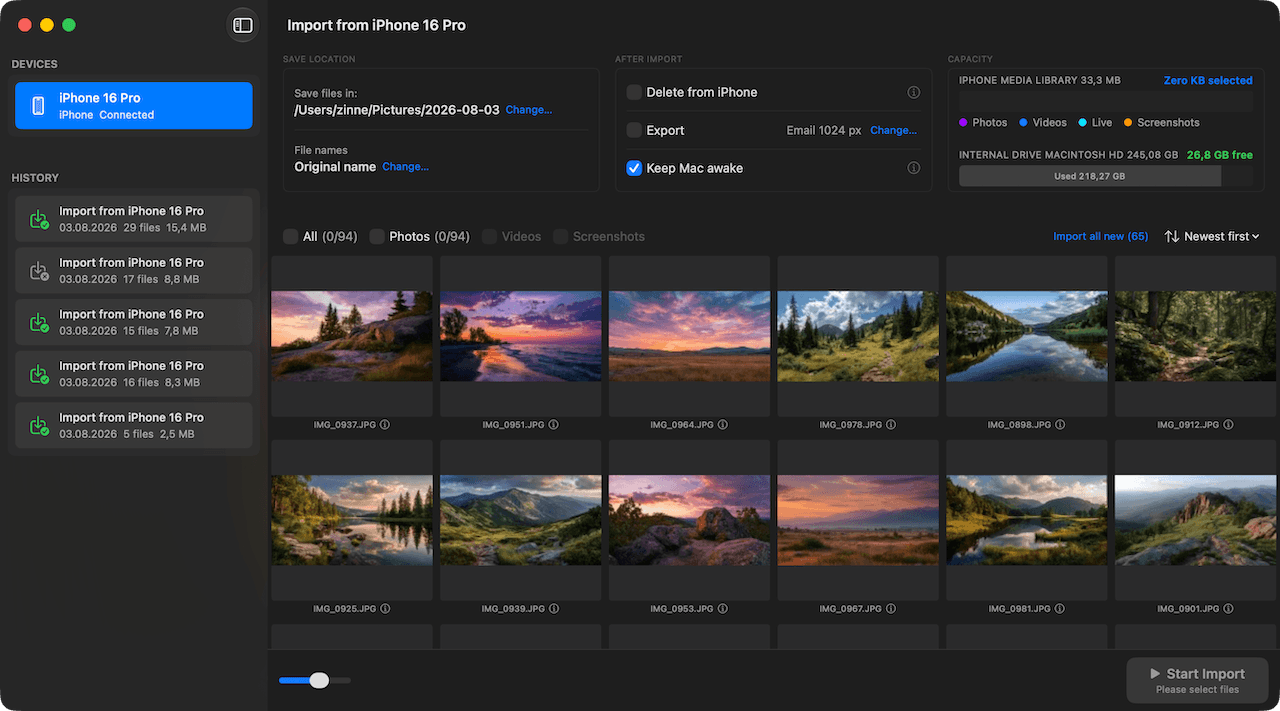
At its core, Photo RollOff does something very simple: connect the iPhone, pick your shots, choose a target folder, start the import. The more features an app gains, the easier it is to lose exactly that clarity. So for version 1.2 we worked on the interface instead of just bolting on more switches.
The result is a view that stays calm even when there is a library of ten thousand items in front of you.
Everything important on one level
Connected devices on the left, your shots in the middle, the import settings on the right. That split sounds obvious, but it makes the difference day to day: you can see at any moment which device is active, what is selected and where the files are going, without jumping between views.
If several iPhones or iPads are connected at once, they all appear in the sidebar. One click switches devices, and the selection on the other one stays intact.
Large libraries without the wait
Opening a very large library now visibly does something: a loading indicator shows that the app is reading the device instead of just sitting there. Thumbnails appear one after another, and you can start scrolling and selecting straight away without waiting for the last entry.
Selection itself got faster too. Selecting everything, picking larger ranges or deselecting individual shots responds without noticeable lag, even across several thousand files.
Storage stays in view
During the import, Photo RollOff continuously shows how much room is left on the iPhone and on the target drive, broken down by file type. So you do not just see that it is progressing, you also see how much storage the import actually frees up.
While an import is running you can pause it, resume it or cancel it at any time. The Mac stays awake in the meantime so a large transfer does not stall halfway through because the machine went to sleep.
Already included
The new interface is part of version 1.2 and costs existing owners nothing. Photo RollOff stays a one-time purchase with no subscription, no account and no in-app purchases.
Less thinking, more importing
Ideally a good interface is not noticed at all. That is exactly what this update aims for: you plug in your iPhone, immediately see where things stand, and are done after a few clicks. Everything else stays in the background until you actually need it.
Related reading
Photo RollOff now speaks Italian, Polish and Dutch
Version 1.2 adds three new languages. Photo RollOff is now fully translated into eight languages.
Rename photos automatically: file names you can find again
With flexible templates, Photo RollOff renames your shots as they are imported, for example by capture date and original name.
Resize images on export without touching the originals
Photo RollOff can shrink imported photos automatically, for email, for your website or for a space-saving archive.