Resize images on export without touching the originals
A photo from an iPhone is several megabytes in no time. For a website or an email that is far too much. Photo RollOff shrinks images automatically if you want it to, and the original stays untouched.
Modern iPhone shots are big. With a 48 megapixel camera you quickly end up with files that are wildly oversized for what you actually do with them. For printing or later editing that resolution is worth its weight in gold, for an email to the family it is simply a nuisance.
Until now that meant: import the images, then open a second app, resize, export. Version 1.2 takes that detour off your hands.
An export mode for everyday use
After the import you can have smaller copies generated from your shots. You decide how large the images should be, and Photo RollOff writes the results into a folder of their own. The imported originals are left untouched.
That is the crucial part: resizing is an additional step, not a replacement. You always keep the full resolution as your basis and produce alongside it exactly the version you need right now.
A template editor instead of fixed sizes
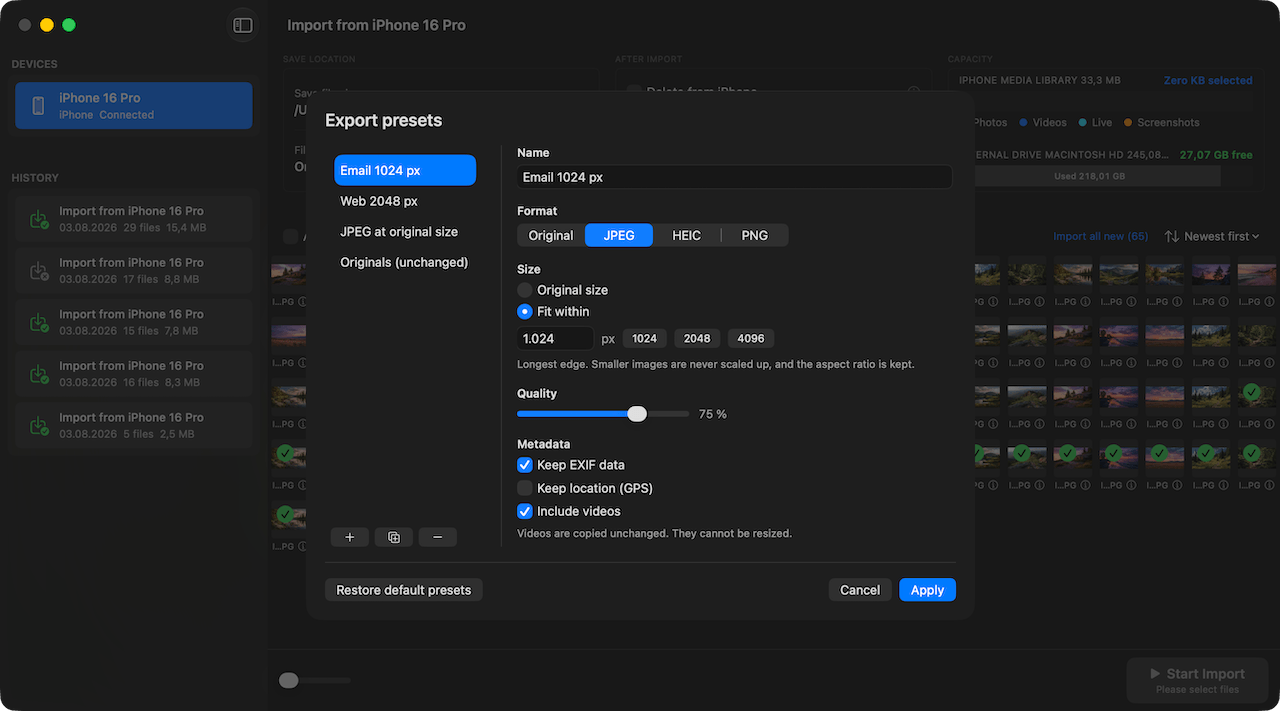
Resizing in Photo RollOff does not mean picking from two or three preset sizes. The app comes with an editor for export presets in which you assemble your own output format and save it under a name of your choice. Anyone who used to work with Aperture will recognise the principle immediately. It is the same building block thinking as in automatic file renaming.
Per preset you set the format, so Original, JPEG, HEIC or PNG, plus the size. Either the original resolution is kept, or you specify a maximum edge length, for example 1024, 2048 or 4096 pixels. The longest edge is always what counts, the aspect ratio is preserved, and smaller images are never scaled up artificially. On top of that there is a slider for quality.
Metadata is a per preset decision too: take the EXIF data along or leave it out and, separately from that, keep or strip the GPS location. This is exactly the point where a preset for email looks different from one for your own archive. Videos are exported along with everything else if you want, but unchanged, because they cannot be resized.
Four presets ship with the app, among them one for email at 1024 pixels and one for the web at 2048 pixels. You can adjust them, create your own, duplicate existing ones and reset everything back to the factory state at any time.
Three typical occasions
For sending by email or messenger a much smaller edge length is usually plenty. Instead of twenty megabytes per image you end up with a fraction of that, and the message goes through without anyone having to think about attachment limits.
For websites and blogs what counts above all is loading time, and smaller files are simply the better choice there. And for the archive: if you have three hundred shots from one event, most of which only serve as documentation, a smaller version saves a considerable amount of disk space.
The originals stay untouched
When resizing, Photo RollOff always works on copies. Your imported original files remain unchanged in the target folder, at full resolution and with complete metadata from EXIF, GPS location and capture time.
That means you can produce a different size at any point without having lost anything. If you only notice later that the small version was too small after all, you simply go back to the original and do it again.
All in one app
Importing, renaming, resizing and clearing out the iPhone all happen in one pass, without a second piece of software. Photo RollOff is a one-time purchase on the App Store and works entirely locally on your Mac.
Keep them large, send them small
You rarely have to genuinely choose between quality and file size. Keep the originals at full resolution and produce from them whatever you need. Photo RollOff turns that into a single step instead of a lost afternoon.
Related reading
Rename photos automatically: file names you can find again
With flexible templates, Photo RollOff renames your shots as they are imported, for example by capture date and original name.
The new interface: tidier and quicker to work with
Version 1.2 brings a reworked interface with a clearer structure, a better overview of large libraries and fewer clicks to the import.
Why Photo RollOff – and why now
How Photo RollOff gives you back your iPhone storage without forcing you into iCloud or a closed photo library.