Rename photos automatically: file names you can find again
IMG_4821.HEIC will mean nothing to you in two years. Photo RollOff renames your shots automatically during the import, following a template you define yourself.
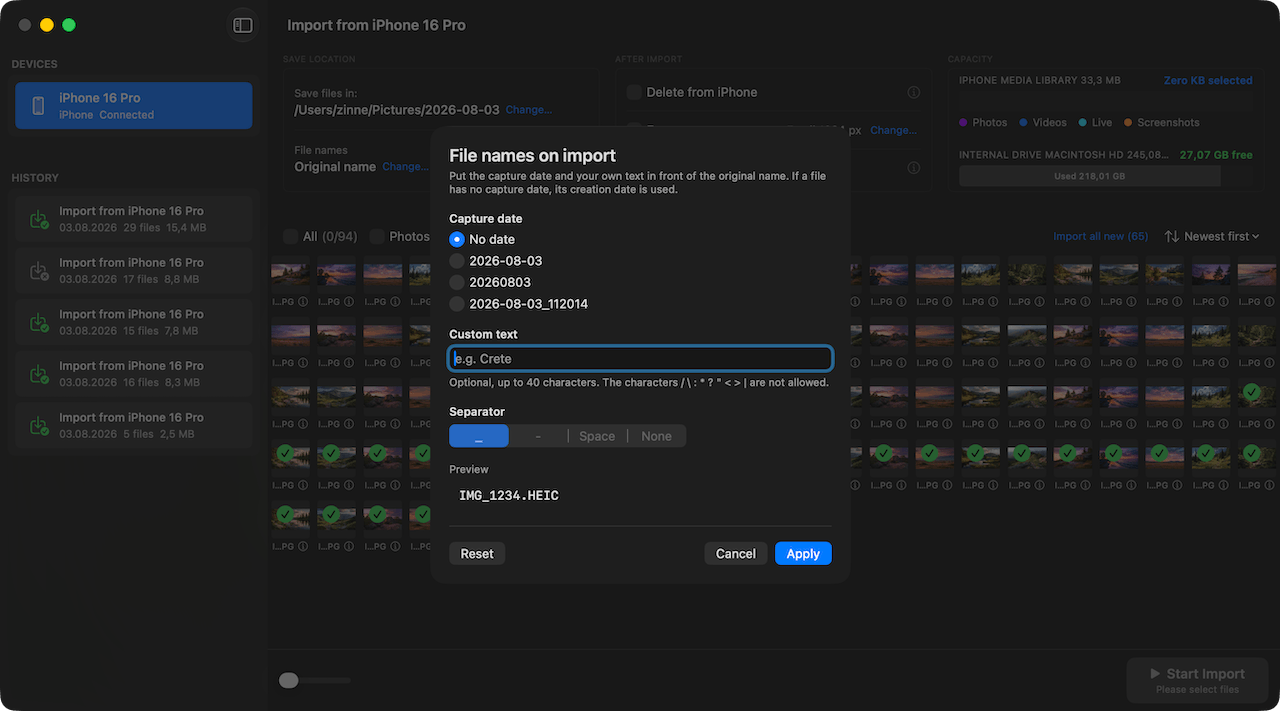
Every iPhone hands out file names the same way: IMG, a running number, done. As long as the images sit on the device nobody minds, because the Photos app takes care of the sorting. The moment those files land in a folder on the Mac, it turns into a problem.
The numbering starts over after you switch devices, it says nothing about when a shot was taken, and when you merge several imports two files suddenly claim the same name. Photo RollOff solves that right at the import.
Templates instead of rigid schemes
Before the import you decide what the files should be called. Photo RollOff builds the name from blocks, among them the capture date, a free text of your choosing and the original file name. IMG_4821.HEIC becomes, for example, 2026-08-03_family_IMG_4821.HEIC.
The capture date comes from the metadata of the file itself, not from the moment of the import. So even images that sat on the iPhone for three years get exactly the name that matches when they were taken.
Why the date belongs at the front
A file name that starts with the date in year, month, day order sorts itself chronologically in any file manager. You need no database, no library and no app managing the order for you. The Finder is enough.
That is exactly where real files play to their strength. A folder full of sensibly named shots stays usable even if you move to a different system or a different piece of software one day.
No collisions, no overwritten images
Because the capture date sits in the name and the original file name is kept, two files practically never meet under the same name. Even if you import several devices into the same folder, Photo RollOff never overwrites anything silently.
The original information is preserved in full. EXIF, GPS location, capture time and camera data all come along unchanged. Only the file name is rewritten, not the content.
Set it once, use it always
Your template is remembered and applies automatically to the next import. Automatic renaming is part of version 1.2 and included in Photo RollOff, with no subscription and no extra purchase.
Order that happens by itself
Nobody enjoys sorting photos after the fact, which is why it mostly never happens. If the right name is created during the import, the job takes care of itself, and your photo folder is still searchable after the twentieth import.
Related reading
Resize images on export without touching the originals
Photo RollOff can shrink imported photos automatically, for email, for your website or for a space-saving archive.
Back up iPhone photos straight to an external SSD or a NAS
How to transfer shots from your iPhone directly to an external drive or a network volume, with no detour through the photo library.
The new interface: tidier and quicker to work with
Version 1.2 brings a reworked interface with a clearer structure, a better overview of large libraries and fewer clicks to the import.